Your eBay business,
all in one place.

Manage your products, listings, orders, inventory, marketing, and buyer messages in one organized workspace. Whether you're managing a single store or multiple eBay accounts, SellerHint helps simplify your daily tasks, streamline your workflow, and keep your business running smoothly.

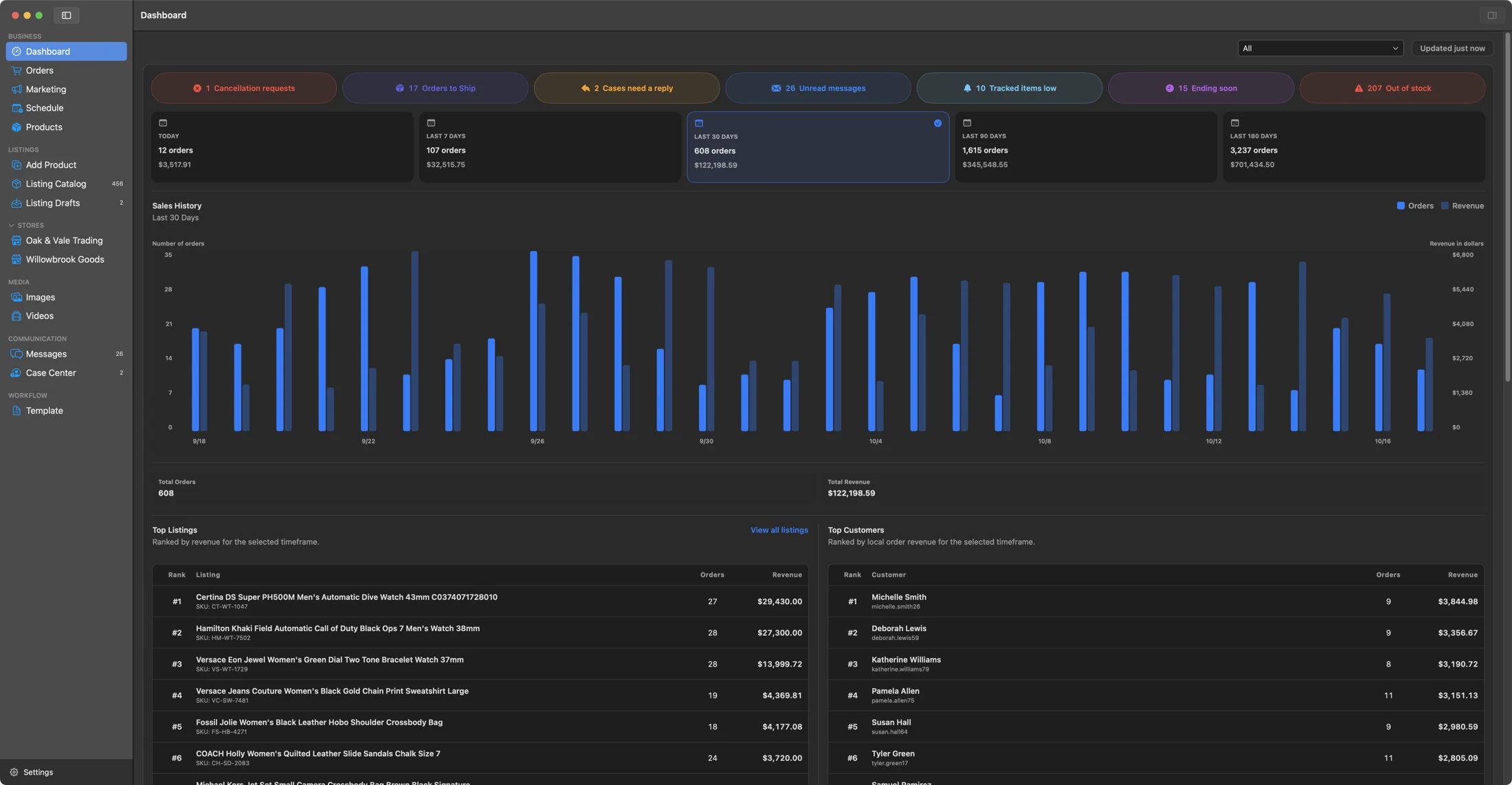
SellerHint for Mac dashboard showing store activity, sales totals, and a sales history chart.

What SellerHint is

SellerHint is a powerful yet easy-to-use tool that helps eBay sellers manage their business more efficiently. From organizing product information and updating listings to managing inventory, reviewing orders, and communicating with buyers, SellerHint provides the tools needed to keep daily operations running smoothly.

Whether you're growing your first eBay store or managing multiple established stores, SellerHint helps you stay organized, save time, and focus on selling. SellerHint is an independent software platform and is not affiliated with, sponsored by, or endorsed by eBay Inc.

Where the hint comes in

Selling at any scale is a long list of small judgements. SellerHint is built for the moment one of them becomes clear.

A normal day looks like this

  • Working out which listing needs attention first
  • Tracking inventory across more than one store
  • Updating many listings without breaking any of them
  • Reviewing how a campaign is actually performing
  • Answering a buyer without losing your place
  • Catching an inventory mistake before it costs you a sale
  • Noticing the thing that needed action yesterday

The hint is the organisation, context and information that makes the next action obvious. Not a tip, and not advice: the product does not tell you what to do with your business. It arranges the work so that what needs doing is visible, and leaves the judgement to you.

Most of that list is not hard because the individual task is hard. It is hard because the information needed to act sits in five places, and because one wrong move reaches a listing that is still selling.

Organised work makes the next action obvious.

Clarity

See what is happening across your eBay stores and know which tasks need your attention each day.

Review listing status, orders, inventory warnings, upcoming end dates, and store activity in one organized view. Clear information helps you spot issues early, prioritize your next steps, and make better decisions throughout the day.

Control

Keep control of your product details, listing changes, and what gets sent to eBay across stores.

Review product edits, inventory targets and quantities, and decide when supported changes are sent to eBay. Store information stays separate, with safeguards that help prevent accidental updates or deletion of products linked to active listings.

Organization

Keep product details and listing information in one place, even across multiple eBay stores.

Bring catalogs, drafts, images, templates, and store-specific settings into one workflow. Track costs, notes, and storage locations alongside listing details, while keeping information accurate and separate for each connected store.

Efficiency

Spend less time switching between tasks and more time managing your business with practical tools.

Use filters, customizable tables, CSV imports, and inventory comparisons to handle busy catalogs. Move between products, orders, messages, marketing, and schedules in an organized workflow that helps reduce repetitive daily work.

Two separate products

SellerHint is available for Mac and Web, each offering a dedicated workspace for managing your eBay business. Both products have separate accounts, subscriptions, and data. A subscription to one does not include access to the other.

SellerHint for Mac

A native macOS application designed for eBay sellers who prefer a dedicated desktop workspace. Manage your selling operations with product information, images, and preferences stored primarily on your Mac.

  • Native macOS app for everyday selling workflows
  • Manage products, listings, inventory, orders, and messages
  • Product records and images stored primarily on your Mac
  • Free plan includes one marketplace account and 100 products
  • Pro supports up to five accounts with no SellerHint product cap

SellerHint Web

A browser-based application designed for eBay sellers who prefer working online. Manage your selling operations in a convenient workspace, with account information and product data stored securely in your separate Web account.

  • Browser-based app for everyday selling workflows
  • Manage products, listings, inventory, orders, and messages
  • Account and product data stored in your Web workspace
  • Separate subscription with its own pricing and billing
  • Mac and Web accounts and data remain separate

The problems it addresses

SellerHint helps simplify the everyday challenges of managing listings, inventory, orders, and multiple eBay stores.

  • Low inventory going unnoticed until a product is nearly sold out.
  • Older listings sitting unsold without a clear way to identify them.
  • Product information scattered across spreadsheets, folders, and eBay.
  • Listing updates that must be repeated manually across multiple stores.
  • Inventory quantities becoming inconsistent from one store to another.
  • Multiple store accounts with information that's difficult to keep separate.
  • Daily tasks requiring constant switching between different selling tools.
  • Live listing changes being made without a clear review process.
  • Product images and notes becoming difficult to organize and manage.

What you can manage

Explore the tools that help you manage products, inventory, orders, and everyday selling tasks. See the Mac and Web feature pages for product-specific details.

Dashboard

See sales performance, listing activity, and inventory warnings in one place, so you know what needs attention.

  • Sales and order performance
  • Top-performing and stale listings
  • Out-of-stock and low-stock alerts
  • Store activity and key trends

Products & Listings

Organize products, listings, drafts, and images while keeping each store's listing details easy to find and manage.

  • Searchable catalog and filters
  • Drafts, templates, and images
  • Product details and item specifics
  • Store-specific listing settings

Orders & Marketing

Review customer orders and manage promotional activity from one workspace, with the details you need for each task.

  • Order and shipment information
  • Invoices, packing slips, and printing
  • Promoted listings and campaigns
  • Buyer offers and marketing reports

Inventory

Track stock levels and compare quantities across connected stores, with safeguards for inventory updates and alerts.

  • Inventory tracking and quantities
  • Low-stock thresholds and warnings
  • Cross-store stock comparisons
  • Reviewed quantity synchronization

Schedule & Automation

Keep up with scheduled listings, approaching end dates, and routine monitoring without losing track of upcoming work.

  • Scheduled listings and activity
  • Listings approaching end dates
  • GTC Guard relist monitoring
  • Background refresh and alerts

Messages & Cases

Handle buyer messages and review return or delivery cases, with store-specific information kept clearly separated.

  • Inbox, sent messages, and replies
  • Store-specific conversations
  • Returns and Item Not Received cases
  • Read-only case details and deadlines

Explore Mac features · Explore Web features

How SellerHint works

From connecting your eBay store to managing products, listings, and daily operations, see how SellerHint brings your selling workflow together.

A typical workflow in SellerHint for Mac. Mac and Web have separate accounts and data.

Step 1 of 6

Connect

Connect your eBay store securely to SellerHint.

Connect your authorized eBay account to access your store's listings and selling information. SellerHint supports managing multiple connected stores while keeping their marketplace data separate.

Which product is right for you?

A short preview. The full comparison covers data location, workflows, billing and support.
 SellerHint for MacSellerHint Web
Feature setNative selling workspacesBrowser selling workspaces
Access methodNative macOS applicationBrowser workspace
Where your data livesPrimarily on your MacRemotely, in a separate backend
Shared with the other productNothingNothing

See the full comparison

Product guides and help

Get to know the workspaces

Follow product-specific guides for setup, connected stores and everyday selling tasks.

Choose your product

Compare native Mac and browser workflows, data storage and separate purchase options.

Get help with a task

Find troubleshooting guides and contact support with the product and operation you need help with.

Common questions

What is SellerHint?

SellerHint is operational software for eBay sellers. It helps you manage the work behind your products and listings: product records, listing drafts and templates, images, orders, inventory quantity, marketing, scheduled work, buyer messages and connected stores.

It is not a marketplace, a payment processor, a shipping carrier, or an official eBay product.

Read the documentation

Is SellerHint affiliated with eBay?

No. SellerHint is an independent product. It is not affiliated with, endorsed by, sponsored by, certified by, or operated by eBay Inc. eBay is a trademark of eBay Inc.

What is the difference between SellerHint for Mac and SellerHint Web?

SellerHint for Mac is a native macOS workspace with product records, managed images, preferences and drafts stored primarily on your Mac. SellerHint Web is a separate browser workspace with its own hosted records and some browser-local preferences.

Use each product’s guides for its controls, storage and supported actions. Familiar workspace names do not establish identical connected features. Accounts, purchases and data remain separate, with no automatic synchronisation.

Read the documentation

Does SellerHint for Mac automatically synchronise with SellerHint Web?

No. There is no synchronisation between the two products in either direction. They do not share accounts, subscriptions, databases, stored images, settings, drafts or marketplace data.

Read the documentation

Can SellerHint manage multiple stores without mixing their data?

Listing values, marketplace identities, policies, orders, messages, cases and campaign records retain their store context. Check the exact record’s store before acting, including in combined views.

Mac store galleries retain store-specific selections. Web Catalog galleries belong to the product and are shared across that product’s store tabs; Web drafts and profiles own separate media.

Configured native Inventory Sync deliberately shares quantity effects across enabled exact links to the same physical stock. It does not copy unrelated listing content, and its run is not limited by the current table filter.

Read the documentation

What does local-first mean?

It means product records, images, preferences, drafts and cached marketplace information are stored primarily on your Mac rather than on a server.

It does not mean SellerHint is offline or cloud-free. eBay authentication, marketplace reads and marketplace writes need an internet connection, and some functions depend on SellerHint services being available.

Read the documentation

Does SellerHint store my eBay password?

No. You sign in on eBay, not in SellerHint. The native Mac application does not contain marketplace application secrets and does not expose raw refresh tokens; authorisation and token handling occur at the SellerHint backend boundary.

SellerHint will never ask you for an eBay password, an OAuth token, an API key or a secret key.

Read the documentation

What is the difference between saving locally and sending changes to eBay?

Save to App in Product Details retains product preparation without sending a general live-listing revision. Save to Store is the explicit supported live-update action; new publication has its own List confirmation.

Check the specific workflow: native Products quantity saves and linked description-template saves can queue marketplace updates. Read per-item results and reconcile uncertain outcomes before retrying.

Read the documentation

What does quantity-only Inventory Sync mean?

Native Inventory Sync checks fresh orders and exact linked non-variation stock across participating enabled stores. Eligible new sales from any participating store reduce the saved shared balance and can queue supported quantity reductions.

It preserves unrelated titles, descriptions, prices and images. Master-store display settings and table filters do not define or reset that shared stock balance. Manual child quantity edits use a separate exact-child workflow.

Read the documentation

Are SellerHint for Mac and SellerHint Web priced separately?

Yes. They are separate products with separate billing, and they are sold differently: SellerHint for Mac is free to download with an optional upgrade at $4.99 per month, and SellerHint Web is a subscription at $9.99 per month.

Paying for one does not include the other, and no combined plan has been announced.

Is SellerHint for Mac free?

SellerHint for Mac is free to download and use, forever. The free tier covers one marketplace account and up to 100 products total across stores, including saved drafts. Each variation child counts separately.

Pro raises that to five marketplace accounts, with no product limit set by SellerHint, at $4.99 per month. Those are United States App Store prices; Apple sets the equivalent in other storefronts.

Does SellerHint pricing include eBay fees?

No. SellerHint pricing covers SellerHint only. eBay seller fees, advertising fees, shipping costs and any taxes you owe on your sales are charged by those parties.

Read all frequently asked questions

Already using SellerHint?

Choose a product